
Last updated: November 19, 2026
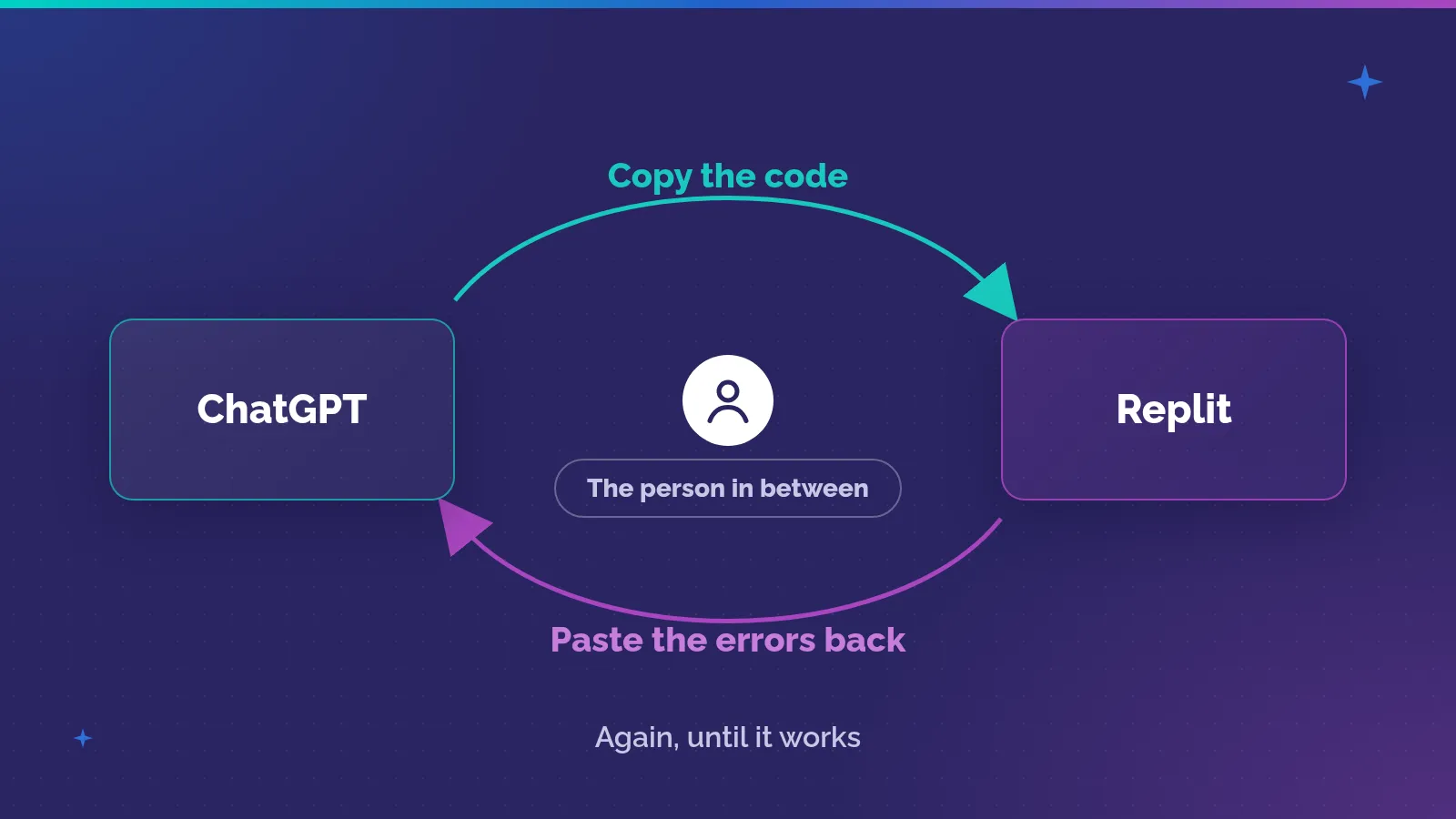
Amjad Masad describes people copying code from ChatGPT into Replit, then copying the errors back. They kept going until they got something that worked. Replit built an agent to handle that loop, taking over work users had been doing by hand.
He tells this story in his conversation with Paul Graham for Y Combinator. What I like about it is how clearly you can see the problem. People had the tools open beside each other. They were doing the work needed to connect them.
The code was useful, but it didn’t finish the task. Someone still had to try it, deal with the errors, and go back for another attempt. According to Masad, the agent took over that repeated work.
I think it’s easy to miss this when we look only at what happens inside our own product. A person gets an output, copies it, and leaves. From our side, that might look like a completed task. From their side, the next part is just starting.
I’ve worked in enterprise software for more than 20 years. I founded Solvait in 2010, and today it’s an agentic AI HR company, so some of the examples below come from HR. They’re illustrations I’ve written for this post, not stories about any client. The idea itself applies to any product, and to any team inside a company that builds tools for its own people.
What happens after someone leaves your product?
A product gives us a convenient place to draw a boundary. We can see what someone clicked and whether the tool produced an output. The customer may draw the boundary somewhere else entirely, at the point where the work is finished.
Masad’s example makes that difference visible. Getting code was a step toward having something that worked. An error wasn’t simply an unsuccessful interaction with a tool. It created another piece of work for the person trying to finish.
The user had to carry that information back to the other tool and continue. If we watched only the code being generated, we would miss the part that made the process awkward.
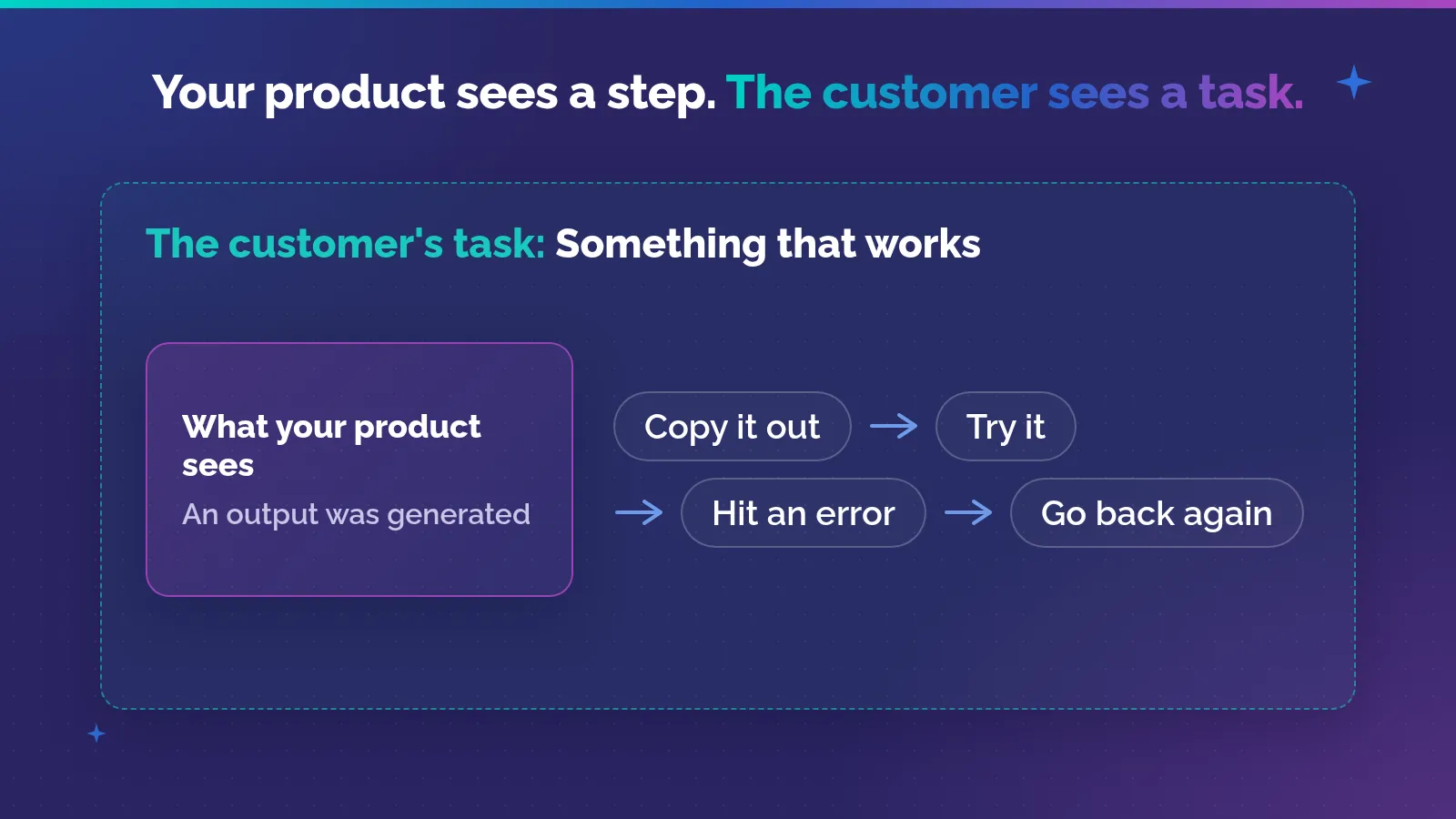
Conceptual illustration of the product boundary in the user behavior Masad describes, approximately 2:02 to 3:42 in the YC conversation. It is not a technical diagram of Replit’s agent.
This is why I’d want to stay for the part after someone leaves a product. They might be preparing the result for someone else, checking it against another record, or repairing a problem. Each possibility means something different for the product team.
A copy-and-paste action alone doesn’t tell us which problem to solve. We need to understand what is being moved and why. Faster copying may help, but sometimes the more useful change is to remove the need for that back-and-forth.
In Masad’s account, Replit addressed the repeated loop. That is a specific account of one product decision. It doesn’t mean every task spread across tools should become an agent.
Why do customers stop mentioning their workarounds?
Eric von Hippel’s 1986 paper on lead users gives a useful answer. He describes lead users as people who face a need months or years before most of the market, and who expect a strong benefit from solving it (p. 6). Because the need is strong, they often try to fill it themselves (p. 1).
Sometimes that means applying existing products “in ways not anticipated by their manufacturers” (p. 12). Sometimes they build something new.
His best-known example is a small one. In the early 1970s, children in southern California were fixing up their bikes to look like motorcycles, with imitation tailpipes and racing on dirt tracks. Manufacturers then brought out a whole line of motocross models. By 1974 those bikes were 8% of all 20-inch bicycles shipped, and two years later they were half of the 3.7 million new juvenile bikes sold (p. 13, quoting a 1978 New York Times report). The customers had shown the product before anyone made it.
Then comes the part that matters most for this post. Von Hippel points out that users who expect a high benefit “might well have solved their problem and no longer feel that need” (p. 11). So a survey that looks for unmet needs might never find them.
That’s a good reason to ask how work gets done, even when the customer sounds satisfied. The awkward method may have become normal to them. It may still leave room for a much better product.
The paper also sets a limit. Lead users’ needs are “typically not precisely the same” as the needs of the wider market that follows them, so their data has to be checked before it’s carried over (p. 14). And the paper is a research approach built on earlier studies and examples. It isn’t a controlled experiment proving that watching a workaround always produces a successful product.
I wouldn’t label Replit’s users lead users on the strength of this conversation alone. The connection is more modest: users combining tools can reveal a need through what they already do. The research gives us a reason to take that behavior seriously, then investigate how widely it matters.
Are your own employees doing the same thing with AI?
Yes, and the large surveys show it clearly. The customer between your tools may be sitting in your own office.
BCG’s 2025 AI at Work survey of 10,635 people found that 54% would use AI tools even if the company had not authorized them (BCG, AI at Work 2025, slide 14). Among frontline employees, 37% said their company isn’t supplying the right tools (slide 12). When the official tool stops short of the task, people carry the work to another one. That’s the Replit loop again, with a security risk attached.
Leaders also tend to see less of this than is happening. In McKinsey’s US survey, C-suite leaders estimated that 4% of employees use gen AI for at least 30% of their daily work. Employees put the figure at 13% (McKinsey, Superagency in the workplace, p. 12, Exhibit 2). The work was there. It just wasn’t visible from the top.
And some of the extra work never shows up in any report. In IBM’s 2026 CHRO study, 80% of executives said AI adoption creates unrecognized work: validating recommendations, correcting errors, adding context and managing exceptions. 42% of employees said AI either increases their work or leaves that work unrecognized (IBM, Designing the Thinking Organization, p. 34). That list reads a lot like what Masad’s users were doing by hand.
This matters in the Gulf in particular. In BCG’s survey, 87% of Middle East respondents (from Kuwait, Qatar, Saudi Arabia and the UAE) use AI at least several times a week, second only to India (slide 7). High use means more workarounds to learn from, and more of them happening out of sight.
None of these figures tells you what your own people are doing. They tell you it’s worth going to look.
How can observation tell us more than a feature request?
Hugh Beyer and Karen Holtzblatt describe a practical approach in their 1999 article on Contextual Design. They start from a simple problem: work often becomes so habitual that the people doing it have difficulty saying exactly what they do and why.
Their answer is contextual inquiry. The interviewer sits with the customer where the work happens, watches real activity, and asks about each action step by step. Through that conversation, the two of them build a shared interpretation of the work.
The important part is combining observation with conversation. Watching silently can leave you guessing. Asking someone to summarize from memory can leave out details that have become routine.
They also give a sense of scale. For a focused problem in one part of a system, they suggest interviewing four to six users. For finding new product opportunities, 15 to 20 users across the market. These are practitioner guidelines, not research results, and the article doesn’t give a success rate for customer observation.
What matters for this example is the kind of information the method seeks. A customer switches tools. The observer asks why. The customer explains what they need next. The team can then check whether it understood the reason, rather than turning a guess into a requirement.
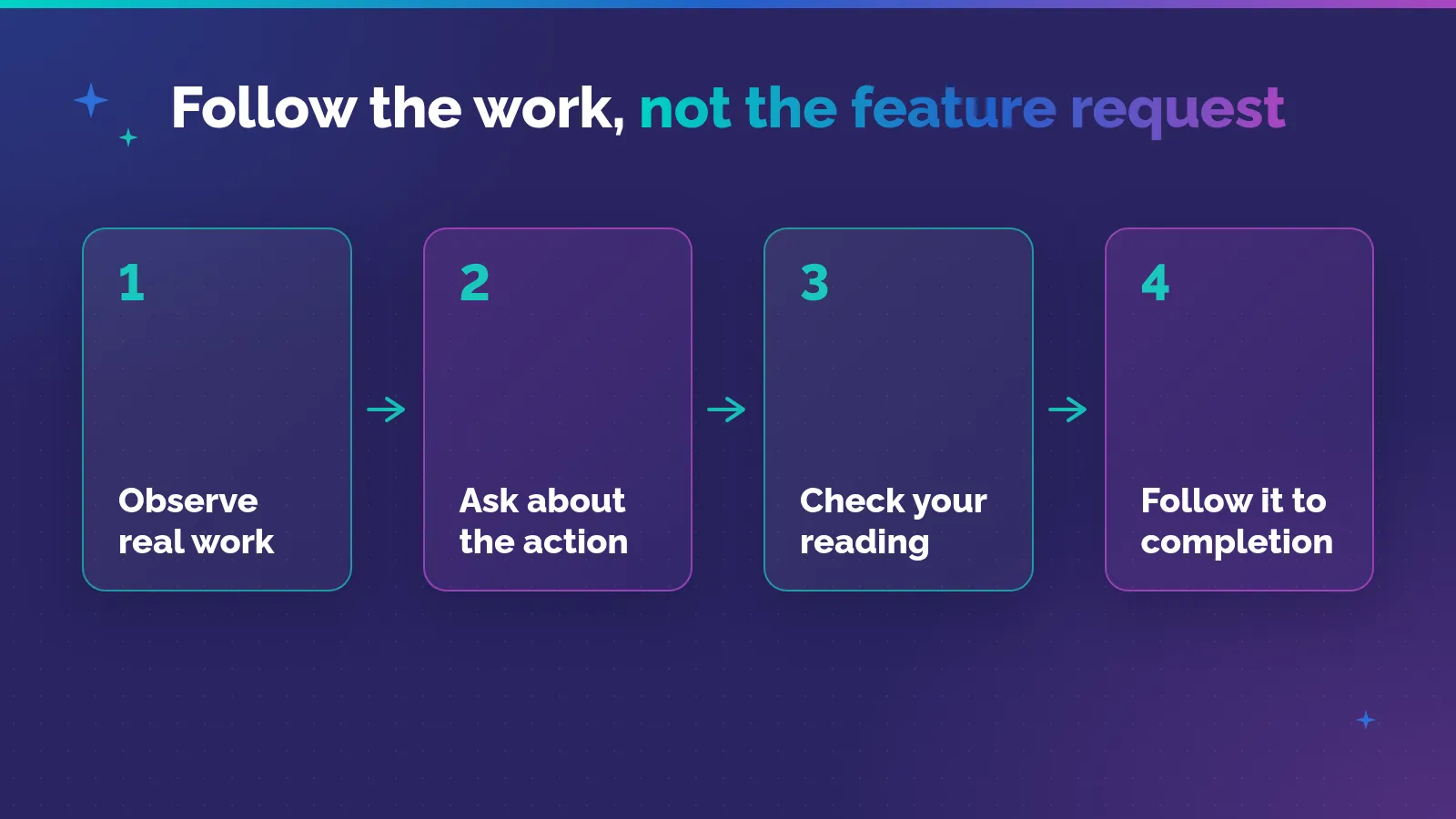
Original illustration informed by Beyer and Holtzblatt’s contextual inquiry method. This is an observation sequence, not an experimental result.
That is a different conversation from asking which feature should come next. A feature request is already a proposed answer. Following the work can help us understand the problem behind it.
The point isn’t to catch customers giving the wrong answer. People usually describe a process at the level needed for a conversation. They may leave out a step because it feels too obvious to mention. Seeing that step happen gives both sides something specific to discuss, and a chance to correct a misunderstanding before it becomes part of the product plan.
Both are useful. Customers can explain priorities that aren’t visible during a single session. They may also know why an apparently awkward step is necessary. Observation adds evidence; it doesn’t make the customer’s explanation less important.
What should we notice in the task itself?
The most revealing moments may be the small actions between the obvious steps. Someone checks a separate file before accepting an output. They save a temporary copy. They send the result to a colleague and wait.
These actions can look like clutter from inside a product team. To the person doing the work, they may be essential. We shouldn’t remove them just because they make a flow diagram untidy.
Here is how I’d read those moments. These are questions to investigate, not conclusions about what every product needs.
| What you observe | What it may mean | What to ask next |
|---|---|---|
| Copying an output elsewhere | The next step sits outside the product | What happens to it there? |
| Returning an error to another tool | The user is coordinating another attempt | What makes them continue or stop? |
| Checking a separate record | Required context may be missing | Which information changes the decision? |
| Sending work to a colleague | Review or permission may be needed | What does that person check? |
The same behavior can have different causes. A separate check might be a workaround for a missing feature, or a deliberate safeguard. We need the explanation before proposing a change.
That concern connects with my earlier piece on accountability, responsibility, and authority. A handoff may look inefficient while carrying an important decision. Removing the movement between tools doesn’t automatically remove the need for that decision.
What does a workaround look like in HR?
I won’t invent a company here. The common patterns are familiar enough that many HR teams will recognize at least one of them.
The first is the spreadsheet next to the HR system. Someone exports leave balances, overtime hours or headcount, then checks or adjusts them in a sheet before anything is approved. The system shows a quick approval. The real checking happens in the sheet, and it often isn’t recorded anywhere.
The second is the approval that happens outside the system. A manager agrees to a request on WhatsApp or by phone, and someone in HR then enters it as if it had gone through the normal route. The record shows who clicked, not who actually decided.
The third is copying data between tools. A new joiner’s details are typed into the HR system, then again into payroll, the access request and the onboarding checklist. Each copy is a chance for a small mismatch that someone has to find later.
A feature request for any of these would probably come out as “add an export button”, “connect WhatsApp” or “link the systems”. Watching the work might show something else: a check people don’t trust the system to do, a decision that needs a faster route, or a handoff nobody owns. Some of them could also be safeguards someone put there on purpose. That’s exactly what the session is for.
What would a useful customer session look like?
I’d start with the last real task the customer tried to finish, and I’d plan the session in three parts.
| Part | What to do | What to avoid |
|---|---|---|
| Before | Pick one recent, real task. Ask for material they’re allowed to share. | Asking them to reveal confidential information for the sake of the session. |
| During | Let them use their normal route. Ask about each action as it happens. Stay with a failed attempt. | Telling them which screens to use, or hinting at the answer you hope to hear. |
| After | Check your reading with them. Then compare with other users and with product records. | Treating one session as proof of how common the problem is. |
Letting them choose their normal route matters. Giving instructions about which screens to use would make it harder to learn how they actually work.
Staying with an unsuccessful attempt matters too. A smooth run can hide the need for repair. When something fails, we can see what the person has to understand before they can continue, and whether another tool or colleague becomes necessary.
Then check the interpretation. Perhaps the team thinks the customer left because a feature was missing. The customer may explain that they had finished their part and needed approval. That correction could prevent a lot of unnecessary development.
Finally, compare what you learned with other users’ experience. A single session can reveal a problem worth studying. It can’t tell you how common the problem is across a market. A broader survey or product records may help answer that different question once the team knows what to look for.
When is a workaround a reason to build something?
When the repeated work is the task itself, not a safeguard around it. Masad’s users weren’t checking anything on purpose. They were moving code and errors back and forth because nothing else would.
The surveys point the same way. In McKinsey’s 2025 global survey, 55% of AI high performers said they had fundamentally redesigned individual workflows, compared with 20% of other respondents (McKinsey, The state of AI in 2025, p. 16, Exhibit 11). PwC’s 2026 CEO Survey report says its work with organizations shows that isolated, tactical AI projects often don’t deliver measurable value (PwC, 29th Global CEO Survey, p. 7). A workaround shows you where the workflow really runs, which is the place to start a redesign.
But building doesn’t mean removing every check. McKinsey also found that 65% of high performers have defined processes for deciding how and when model outputs need human validation, against 23% of others (p. 20, Exhibit 14). Some of the steps a customer does by hand are exactly that kind of check.
There is a related idea in my earlier article about Operator: software can act across an interface. And in agentic AI in HR in Saudi Arabia I wrote about agents doing the work and passing hard decisions to people. The question here comes before choosing that technology. Which work needs to be connected, and what would finishing it properly look like?
The answer may lead to an agent, as Masad describes. It could also lead to a smaller change, such as carrying the right context into the next step. Watching the task should leave room for either answer.
What stays with me about the Replit example is that the need was visible in the repeated effort. People were already showing the work they needed help with. Before asking a customer for the next feature, I’d want to understand the part of their day that starts when our product stops.
If you’ve watched a customer or a colleague do something like this, drop me a message. I’d like to hear what they were carrying between the tools.
Frequently asked questions
What is a customer workaround?
A customer workaround is the extra work a person does to finish a task your product doesn’t fully cover. It might be copying an output into another tool, checking it against a separate record, or sending it to a colleague. In Masad’s example, users copied code from ChatGPT into Replit and pasted the errors back until it worked. The workaround shows where the real task ends.
Why don’t customers ask for a fix to their workaround?
Often because the workaround already works for them. Von Hippel notes that users who solved a problem may no longer feel the need, so a survey about unmet needs might never find it. People also leave out steps that feel too obvious to mention. That’s why it helps to watch the work, not only ask about it, and to ask how a task gets done even when the customer sounds satisfied.
What is contextual inquiry?
Contextual inquiry is a research method described by Hugh Beyer and Karen Holtzblatt. The interviewer sits with a customer where the work happens, watches real activity, and asks about each action step by step. Together they build a shared reading of the work. It combines observation with conversation, so the team isn’t left guessing from silent watching or relying on a summary from memory.
How many customers should we observe?
Beyer and Holtzblatt suggest four to six users for a focused problem in one part of a system, and 15 to 20 users across the market when you’re looking for new product opportunities. Those are practitioner guidelines, not research results. Once a session shows you what to look for, a broader survey or product records can tell you how common the problem is.
Is shadow AI a kind of customer workaround?
In a way, yes. BCG’s 2025 survey found that 54% of respondents would use AI tools even if their company hadn’t authorized them, and 37% of frontline employees said their company isn’t supplying the right tools. When people do that, they’re carrying work around a tool that stops short. It carries a security risk, but it also shows you where the official tools fall short.
References
- Y Combinator, Paul Graham in conversation with Amjad Masad, video on X (approximately 2:02 to 3:42: users copying code from ChatGPT into Replit and errors back; Replit building an agent for that loop). User behavior and agent development are Masad’s account, not independently verified.
- Eric von Hippel, Lead Users: A Source of Novel Product Concepts (PDF), Management Science 32(7), July 1986, pp. 791 to 805 (pages below are the author-hosted manuscript PDF: p. 1 abstract, lead users often attempt to fill the need; p. 6 two characteristics of lead users; p. 11 users who solved a problem may no longer feel the need; p. 12 applying existing products in ways not anticipated by their manufacturers; p. 13 motocross bikes, 8% of 20-inch bicycles shipped by 1974 and half of 3.7 million juvenile bikes two years later, quoting the New York Times, January 29, 1978; p. 14 lead user needs not precisely the same as the later market).
- Hugh Beyer and Karen Holtzblatt, Contextual Design, interactions 6(1), January and February 1999, starting p. 32 (web version, no page breaks: habitual work is hard to articulate; contextual inquiry observes and asks about actions step by step toward a shared interpretation; four to six users for a focused problem, 15 to 20 users for new product opportunities).
- BCG, AI at Work 2025: Momentum Builds, but Gaps Remain (PDF), June 2025 (slide 2: 10,635 respondents in 11 markets, Middle East from Kuwait, Qatar, Saudi Arabia and the UAE; slide 7: 87% of Middle East respondents use AI at least several times a week; slide 12: 37% of frontline employees say their company isn’t supplying the right tools, n = 3,537; slide 14: 54% would use AI tools even if not authorized).
- McKinsey & Company, Superagency in the workplace: Empowering people to unlock AI’s full potential (PDF), January 2025 (p. 12, Exhibit 2: C-suite leaders estimate 4% of employees use gen AI for at least 30% of their daily work, employees report 13%; US surveys, n = 118 C-suite and 3,002 employees).
- IBM Institute for Business Value, Designing the Thinking Organization: 2026 CHRO Study (PDF), September 2026 (p. 34: 80% of executives say AI adoption creates unrecognized work, 42% of employees say AI increases their work or leaves it unrecognized. Printed page; add 2 for the PDF page).
- McKinsey & Company, QuantumBlack, The state of AI in 2025: Agents, innovation, and transformation (PDF), November 2025 (p. 16, Exhibit 11: 55% of AI high performers vs 20% of others fundamentally redesigned individual workflows; p. 20, Exhibit 14: 65% vs 23% have defined processes for when model outputs need human validation; 1,993 participants).
- PwC, 29th Global CEO Survey: Leading through uncertainty in the age of AI (PDF), January 2026 (p. 7: PwC’s work with organizations shows isolated, tactical AI projects often don’t deliver measurable value; p. 23: 4,454 CEOs in 95 countries and territories).